
Virtual Context Paging
Run long multi-hour development sessions without context limits. Turbostar automatically pages history in and out like virtual memory, preserving deep project history while keeping costs low.
Native development (C, C++, Rust) demands more than just adding print statements. Turbostar equips LLM agents with high-fidelity compiler feedback, coredump debugging, and cycle-accurate performance profiling.
An "N-1" model with a good set of tools for the task will outperform an "N" frontier model with a mediocre set of tools.
The default behavior for LLM agents today is to fall back on raw shell commands. While this works for simple scripts, native development is complex. LLMs need more than unstructured bash access—they need "X-ray vision" into the codebase, curated compiler diagnostics, and steered access to debugging tools.
For editors, deep Language Server (LSP) integration makes the difference between a text editor and a development environment. For AI agents, it's their "X-ray vision" into the codebase.
fs_grep_files pinpoints primary symbol definition locations and automatically annotates every matching line with its enclosing C++ function/method scope.semcode-lsp with semantic CLI queries to deliver instant symbol navigation, struct layout discovery, and call graphs. This enables AI agents to strictly adhere to Linux kernel coding rules and navigate complex subsystem abstractions without stalling or memory bloat.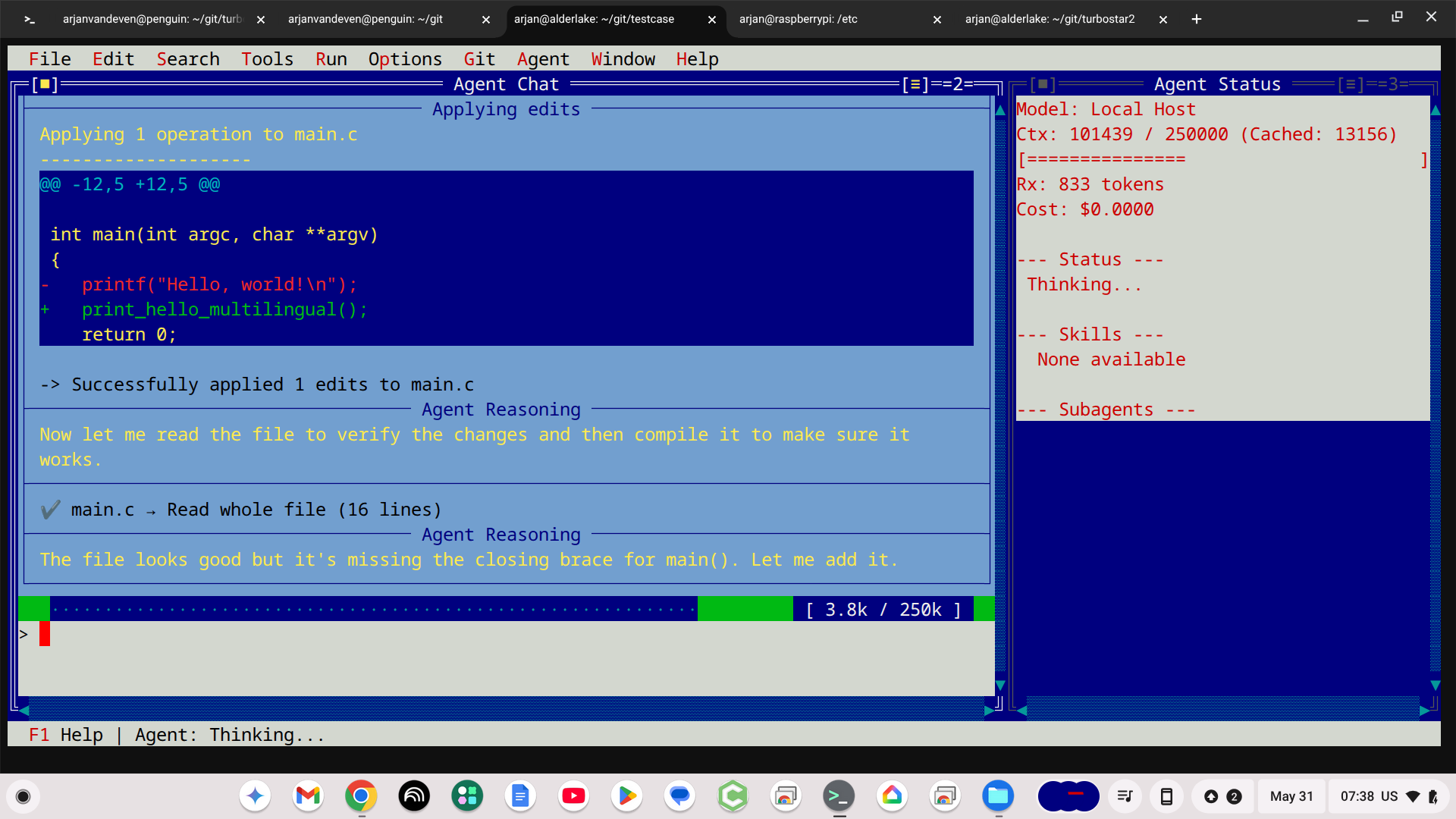
Compiling native code generates massive output. Turbostar optimizes this experience simultaneously for humans and machines.
[1021/1193] Compiling C++ object src_main.cpp.o
../src/main.cpp: In function ‘std::string get_home_dir()’:
../src/main.cpp:33:13: warning: unused variable ‘foo’
[symbol: get_home_dir (lines 31-38)]
 33 |   int foo;
| ^~~The Least Friction Principle: LLMs will use information that is easy to get, or to which they are explicitly steered. When native code crashes, Turbostar intercepts it instantly.
agent_debug_coredump, allowing it to drive GDB autonomously to inspect frames, arguments, and local variables.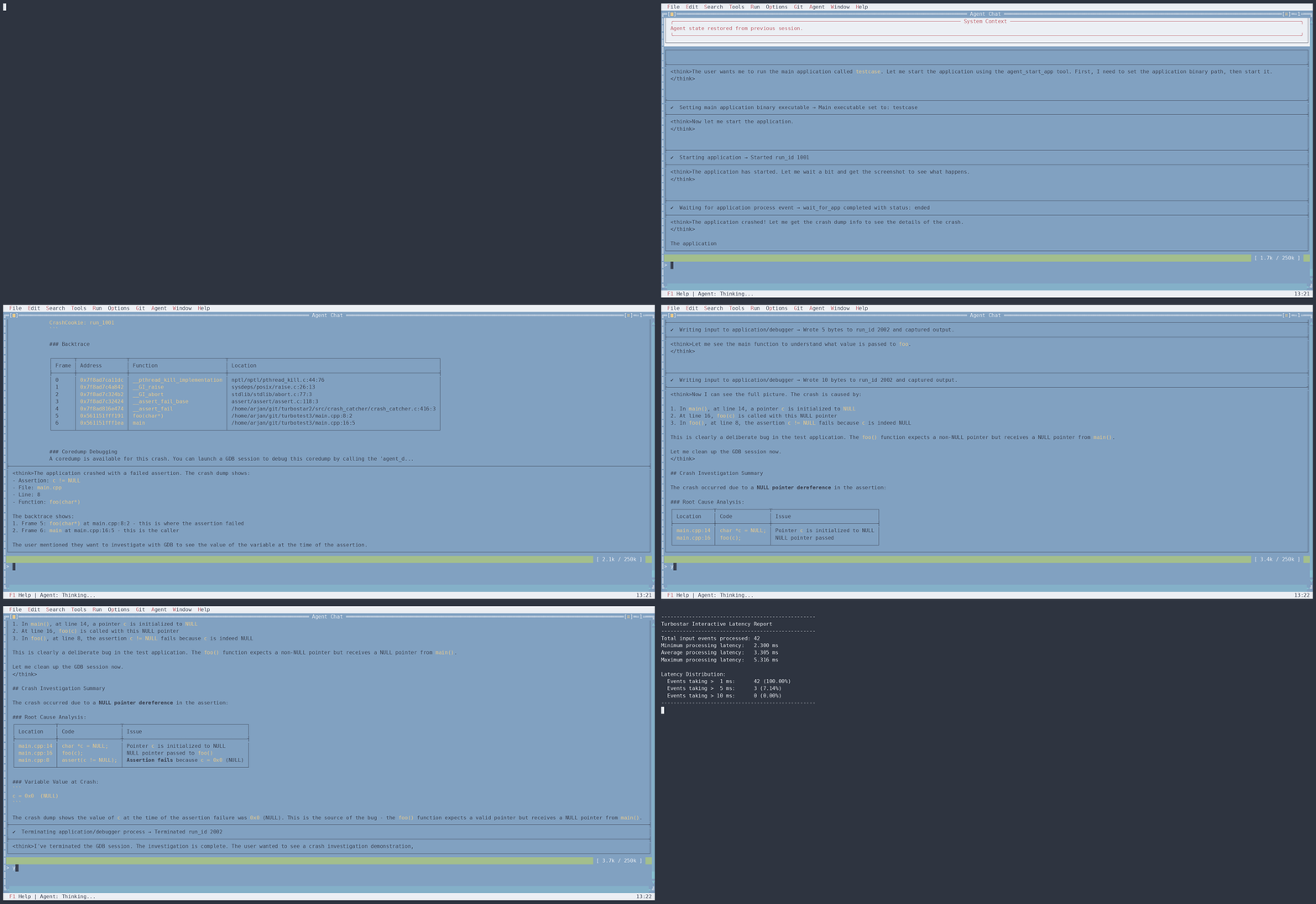
Performance matters for native applications (otherwise we'd use Python/JS). However, the Linux perf tool is messy, highly verbose, and operates on assembly—making it a terrible fit for LLM context limits.
run_executable(collect_performance=true), review the top bottlenecks, and execute laser-focused algorithmic optimizations.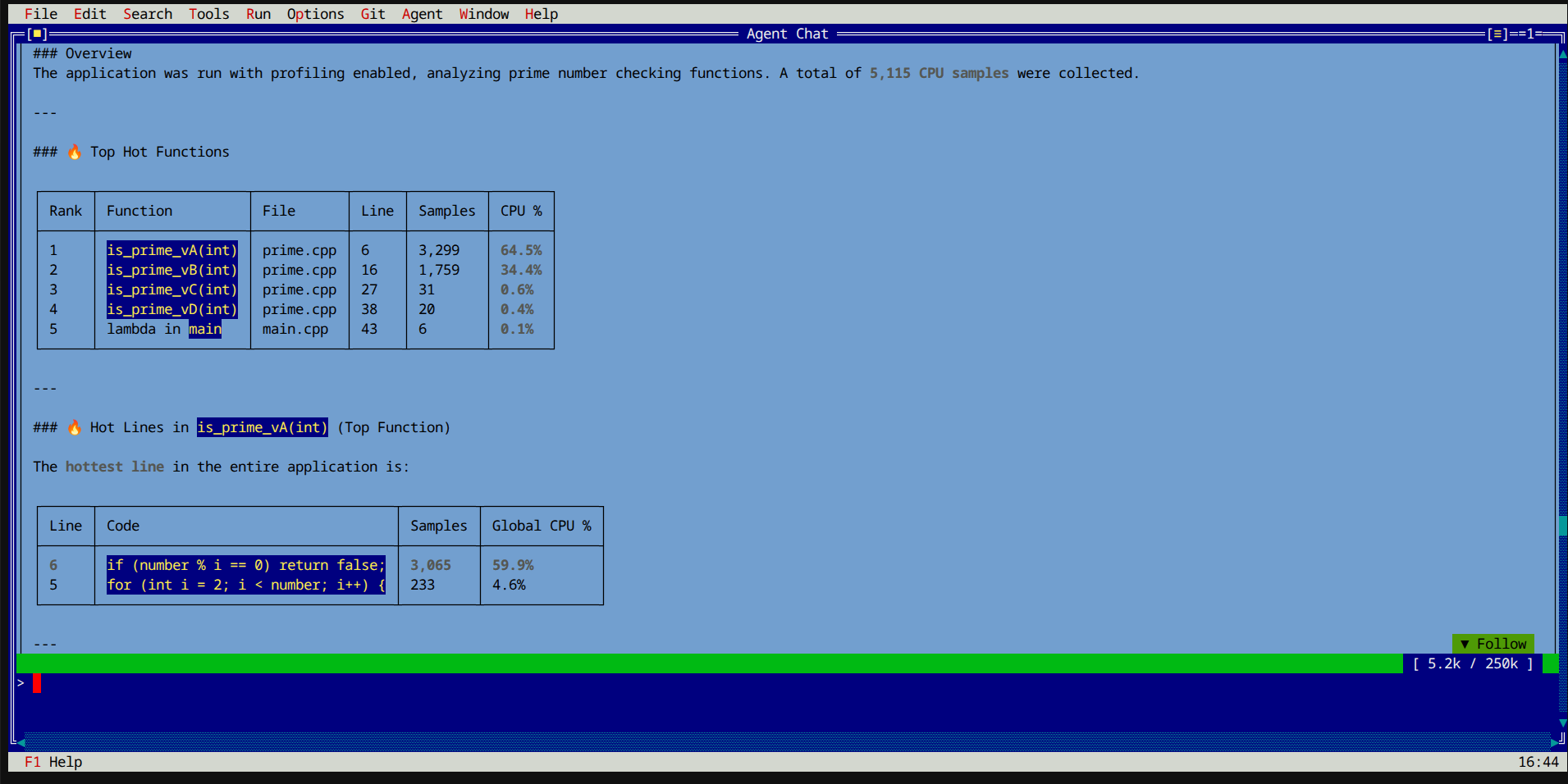
Native software isn't just text—it's compiled binaries, compressed archives, and media assets. Turbostar extends the agent's X-ray vision into the binary domain.
hexinspect to natively parse ELF headers and binary metadata.hexdump automatically annotates raw bytes with disassembled instructions and DWARF/ELF section data.run_cpp and run_python enable agents to test modern C++23 header behavior or link directly against engine static libraries (libturbostar_core.a) in memory without cluttering the git workspace.# Agent analyzing ELF structure
hexinspect(path: "build/testcase", offset: 0, size: 32)
=> | **MIME Type** | application/x-pie-executable |
| **Description** | ELF 64-bit LSB pie executable, x86-64 ... |
* **[0x0 - 0x0]**: `7f` | ELF Magic Sign: '\x7fELF'
* **[0x1 - 0x1]**: `45` | ELF Magic Sign: '\x7fELF'
* **[0x4 - 0x4]**: `02` | ELF Ehdr: e_ident[EI_CLASS] = ELFCLASS64
* **[0x10 - 0x10]**: `03` | ELF Ehdr: e_type = ET_DYN (Shared object)
# Contextual hexdumping with inline disassembly & ELF sections
hexdump(path: "build/testcase", offset: 4224, size: 32)
=> 00001080: 31 ed 49 89 d1 5e 48 89 |1.I..^H.| # xor %ebp, %ebp | ELF Sec ".text"
00001088: e2 48 83 e4 f0 50 54 45 |.H...PTE| # mov %rdx, %r9 | ELF Sec ".text"Turbostar includes a suite of integrated tools designed to give your agents superpowers across any language.
Run long multi-hour development sessions without context limits. Turbostar automatically pages history in and out like virtual memory, preserving deep project history while keeping costs low.
Keep AI agents fast, focused, and affordable. Agents load specialized capabilities (like git, hexedit, or x86asm) only when required, preventing context bloat and hallucination.
Interactively build custom subagents with full tools and skills, then serve them over A2A directly from the same environment with --git-worktree instant workspace pre-seeding.
Code with complete safety. File replacement tools feature strict AST brace-balance verification that rejects syntax-corrupting edits, while all modifications integrate directly into the editor's undo buffer.
Navigate multi-million line codebases with zero lag. Turbostar automatically activates its hybrid semcode engine when indexing Linux kernel trees, giving agents and developers instant cross-referencing, semantic type inspection, and caller graphs aligned with Linux kernel AI rules.
Explore architectural slide decks on building and optimizing AI coding agents for native systems.
Slide deck exploring why systems development (C, C++, Rust) demands specialized agent tools—from LSP X-ray vision and curated compiler diagnostics to GDB coredump analysis and cycle-accurate performance profiling.
View Presentation (PDF) →Architectural presentation detailing how to build a headless, sandboxed Agent CLI with tool registration, execution pipelines, session recovery, and subagent orchestration.
View Presentation (PDF) →